Generate a voiceover for your Substack posts

Paste your Substack draft into Voxi.fm, generate a natural-sounding MP3, then upload it to Substack as the post’s voiceover. Substack handles the player and the podcast feed; Voxi handles the audio.

Generate your first voiceover

Add a voiceover to your Substack post

Phase A — Generate the audio with Voxi.fm
1

Sign up for Voxi.fm

The free tier covers 5 article generations. Create an account.

2

Paste your Substack post URL or text

Voxi.fm extracts the readable content from a published post URL automatically (if it's public), or you can paste the text directly from your draft.

3

Pick a voice, then generate

Preview a few voices and pick one that fits the tone of your newsletter. Generation usually finishes in a few minutes.

4

Download the MP3

From your Voxi library, download the finished audio file. You’ll upload this to Substack in the next phase.

Phase B — Add it to Substack as a voiceover
1

Open the Substack post editor

Open the post you want to add a voiceover to — this works for new drafts and for posts you’ve already published.

2

Use Substack’s voiceover feature to upload your MP3

Substack lets you attach an audio voiceover to any post. In the post editor toolbar, click the headphones icon and choose Voiceover, then upload the MP3 you downloaded from Voxi.fm. Subscribers will see the voiceover player inside the post when it goes out.
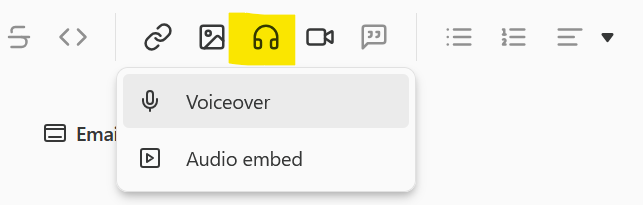
Substack post editor toolbar with the headphones icon highlighted and a dropdown showing Voiceover and Audio embed options
Click the headphones icon in the editor toolbar, then pick Voiceover.

Turn your Substack into a podcast

1

Enable Substack’s podcast RSS feed

In your Substack publication settings, turn on the podcast feed. Substack generates an RSS feed URL that acts as the bridge between your publication and external podcast platforms like Apple Podcasts and Spotify.

2

Opt each voiceover in to the feed

Voiceovers don’t flow into the podcast feed automatically — you have to opt each one in. For a new post, on the final publishing settings page, tick Add voiceover to podcast RSS feed.
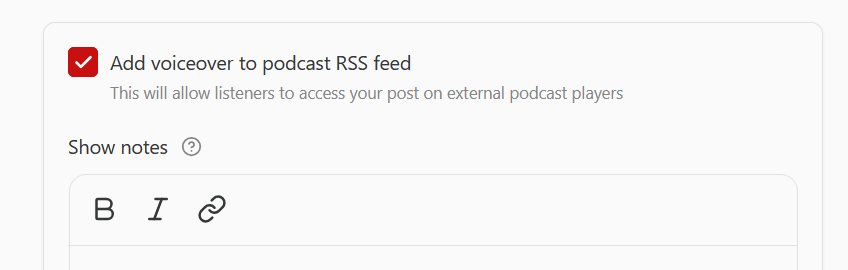
Substack publishing settings showing the "Add voiceover to podcast RSS feed" checkbox ticked
The checkbox you’re looking for in Substack’s publishing settings.

Already-published posts work too: open the post, add the voiceover if it doesn’t have one, then open the same settings panel and check the box. Only posts where this box is ticked become podcast episodes.

3

Submit the feed to podcast platforms

From your Substack settings, use the built-in buttons to submit your RSS feed to Apple Podcasts, Spotify, and other directories. Once each platform approves it, any post you opted in at Step 2 will appear as an episode.

Future posts will automatically become episodes when you check the Add voiceover to podcast RSS feed box.

For more details, see these Substack help pages:

Open pricing

Free trial with 5 articles. Paid plans from a few dollars a month. Generate as many voiceovers as your plan covers each month.

See pricing

Frequently asked questions

Does Voxi.fm replace Substack's audio player?

No. Voxi.fm generates the MP3; Substack hosts and plays it inside the post. You get the polish of a high-quality AI voice without leaving the Substack reading experience.

Does Substack's audio player do text highlighting

Substack does not currently offer this feature. And it does not allow writers to add custom HTML, to embed a player like ours.

Will the voiceover appear on Apple Podcasts and Spotify?

Yes — Substack exposes a podcast RSS feed for your publication that includes the voiceovers. Subscribers can subscribe in any podcast app. See Substack's own guide for the latest details on enabling this.

What audio format does Substack accept?

Voxi.fm exports MP3, which is the format Substack's voiceover upload expects. Just download the file from your Voxi library and upload it to your Substack post.

Can I edit the text before generating the audio?

Yes — you can edit the article text to be narrated in Voxi and regenerate before downloading the MP3. On paid plans you can also customise or remove the short Voxi intro.

How much does Voxi.fm cost?

Free trial covers 5 articles. Paid monthly plans start low and scale up; you can also buy top-up credits as a one-time purchase.

Ready to give your newsletter a voice?

Generate your first voiceover free — upload it to Substack in minutes.

Create account